
Five Weekly Reporting Metrics For Job Search Outreach
Cold outreach typically yields 1–8.5% response rates, but mid‑career jobseekers who track five weekly metrics (emails sent, opens, replies, meetings booked, bounces/unsubscribes) and prioritize targeted, personalized outreach can move through the hiring funnel up to 70% faster. Most important takeaway: treat reply and meeting rates as primary signals - if reply rate is below 5% overhaul your script and targeting, and spend 30 minutes weekly logging benchmarks (40–60% open, 5–10% reply, 1–8% meetings, <2% bounce) to iterate rather than chasing opens.
Build an Unfair Advantage Proactively and Update Your Job Search Strategy to Today's Job Market.
$197
Learn MoreThe Real Cost of Ignoring Cold Outreach Metrics: Why Your Job Search Needs A Weekly System
Skip the data, and hours vanish. Most cold emails go unanswered - average response rates hover between 1% and 8.5% depending on industry and list quality. Yet candidates who track their open, reply, and meeting rates move through the hiring funnel up to 70% faster, based on research from Instantly and HubSpot.
This checklist is for proactive, mid-career professionals who refuse to wait for a recruiter’s call or hope their resume magically surfaces. You want a repeatable outreach system that cuts through noise, sidesteps job board black holes, and pinpoints which messages actually move the needle. With a weekly system, you stop guessing and start building momentum one metric at a time.
The five-metric system here separates signal from noise so you can double down on what works, scrap what doesn’t. Each metric offers a feedback loop, turning your outreach into a strategic campaign. For more on outreach benchmarks and building a proactive search, see our guides on job search outreach benchmarks and building an unfair advantage.
Stop Chasing Vanity: What Actually Matters Before You Track
Open rates don’t land interviews - replies and meetings do. Privacy filters now blur open data, so don’t chase it. Focus on signals that actually move the needle: replies from decision-makers, booked calls, and genuine engagement. That’s what separates progress from noise.
- One tracking method that fits your workflow: spreadsheet, CRM, or just a notepad if you’re consistent
- Current baseline: count emails sent, replies, meetings set, and bounces for the past week or two
- Benchmarks: 40–60% open, 5–10% reply, 1–8% meeting booked, under 2% bounce, under 0.5% unsubscribe
- A clear, prioritized target list - no mass blasts (see our guide to prioritizing companies)
Block 30 minutes each week - same slot, same spot - to log and review these numbers. If your data’s in order, the full checklist takes under 20 minutes. For setup tips, outreach benchmarks, and targeting strategy, see our performance measurement guide and this proactive job search playbook. Planning to scale personalization or overhaul follow-ups? Review personalized outreach at scale and sequencing lost opportunities before you start tracking.
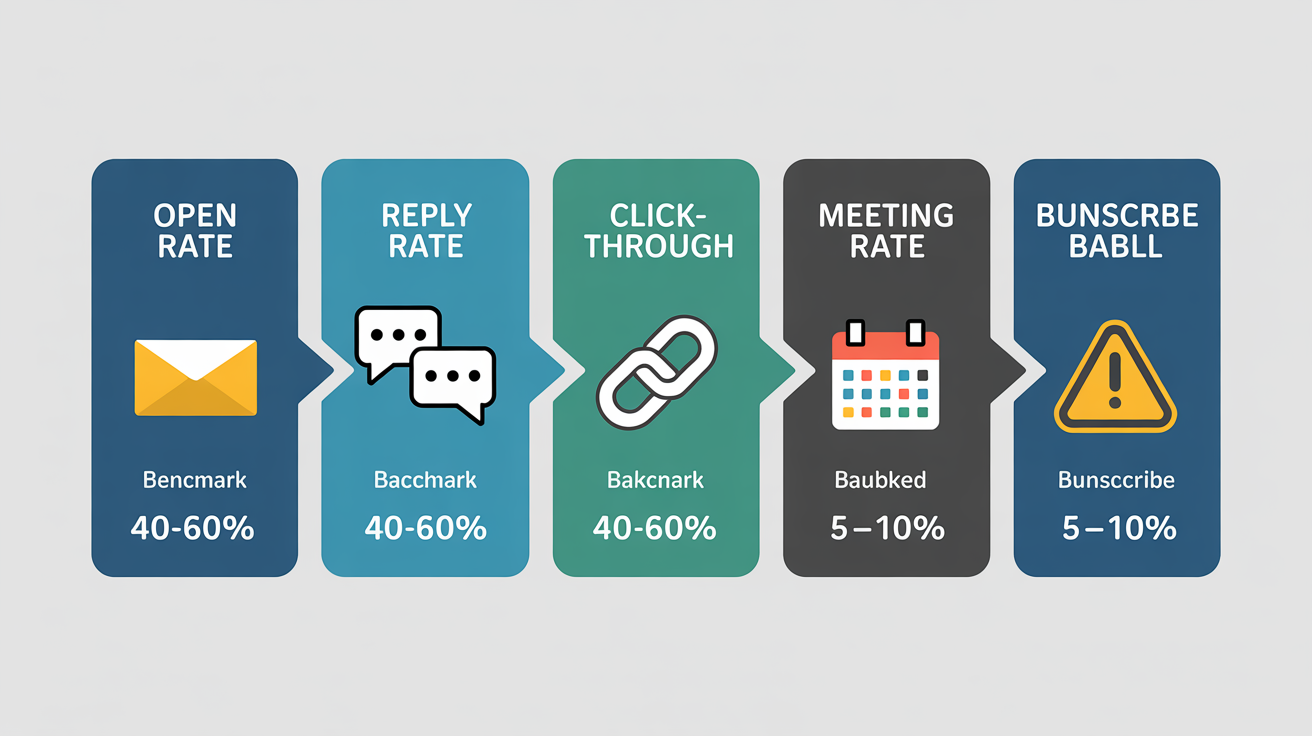
The Five Weekly Metrics That Make or Break Your Job Search Outreach
Reply rate drives your outreach. No replies, no progress. If you’re under 5%, your script or targeting needs immediate work. Each campaign gets one shot - don’t waste it.
- Track reply rate across every touchpoint. This is your main signal. Drop below 5%? Overhaul your message, sharpen your targeting, and add sharper personalization. Reply rate shows if you’re reaching the right people with the right pitch.
- Monitor open rate, but don’t chase it. Open rate tells you if subject lines and sender names are clearing the first hurdle. Under 30%? Your emails aren’t being seen. If rates tank or dip below the usual 40–60%, test three new subject lines and check sender reputation. See our guide to subject lines and open windows for A/B tactics.
- Measure meeting booked rate - track every reply that leads to a real conversation. Replies without meetings mean your follow-up or qualifying questions miss the mark. Top campaigns hit 2–8% meeting booked rate. Review turning replies into interviews for scripts that close the gap.
- Log click-through rate if you include links (portfolio, LinkedIn, or calendar links only). Under 3% CTR? Your value prop or CTA isn’t landing. Place links high, keep the ask tight, and stick to one clear CTA per message. No clicks? A/B test CTA wording or link placement this week.
- Track bounce rate every week - over 2% means your list is decaying. Bounces crush deliverability. Verify contacts before sending. Even if your tool offers list cleaning, cross-check manually if you see a spike. Hard bounces above 2% need an immediate list audit.
- Watch unsubscribe rate for signs of audience fatigue or a mismatch. Over 0.5%? Your targeting or send frequency is off. Clean your list, segment tighter, and stop mass-blasting. Even small tweaks - like changing send times or tone - can pull this rate back down.
- Tag positive vs. negative replies. Not all replies help. If half your responses are “not interested,” you’re not resonating. Tag every reply as positive, neutral, or negative. This reveals if your outreach lands with decision-makers or just triggers polite rejections.
- Record average response time for each campaign. Fast replies (under 24 hours) signal urgency and interest. If responses drag, adjust send times or reference timely company news. Use your CRM or a simple spreadsheet to spot patterns.
- Segment results by channel and message type. Cold email, LinkedIn, referrals - track stats for each. Break down performance by message variant, sequence step, and intro path. This shows what’s working and what needs cutting.
- Review weekly benchmarks in context of campaign size and industry norms. Small, focused lists should outperform bulk sends. Tech and software roles? Expect lower reply rates (often under 2%), but don’t settle. See our performance measurement guide for breakdowns and strategic pivots.
- If a metric tanks, run a focused test. Don’t change everything. Pick one variable - subject line, CTA, or personalization depth - and track the result. Smart A/B testing builds a real feedback loop.
- Log your numbers in one place - same day, same time each week. Consistency spots trends that ad-hoc reviews miss. Use a spreadsheet, CRM, or your outreach tool’s tracker. Block 30 minutes every week to check, record, and troubleshoot.
Short on time? Prioritize reply rate, meeting booked rate, and bounce rate. These three show if your outreach is getting seen, who’s engaging, and whether your list is holding you back. For deeper benchmarks and troubleshooting, see the proactive job search playbook and our company research and targeting process. For workflow tips, check how much time to budget weekly.
Metrics only matter if you act on them. Each week, your data gives you a lever - pull it. For more frameworks, see the essential outreach metrics and our reply-to-meeting scripts.
Turn Metrics Into Momentum: What To Do With Your Data Each Week
Your five metrics mean nothing unless you act on them. The fastest way to improve: each week, pick your weakest stat and change one variable tied to it. Rotate through subject lines, intros, or CTAs. Small tweaks, repeated, drive real gains - especially in response and meeting rates.
- Spot your lowest metric. Make it your only focus that week - ignore the rest.
- Open rates lagging? A/B test three new subject lines. Log which one wins.
- Reply rates flat? Rewrite your intro. Double down on personalization. Mention something timely about each target company.
- No meetings? Shorten your CTA and soften your ask. Add a gentle follow-up midweek.
- Block 30 minutes every Friday. Review KPIs, update your tracker, and note exactly what you changed. This cadence drives improvement.
Run this checklist weekly - no exceptions. Unchecked campaigns drift. Set a recurring Friday calendar block to review stats, launch tests, and record outcomes. For sharper benchmarks, stack your weekly numbers against our outreach performance benchmarks. Need advanced fixes? Scan the proactive outreach playbook. For tactical tweaks, try reply-to-meeting scripts or experiment with seven proven A/B tests to break through plateaus.
The Core Advantage: Why Consistent Tracking Gets You More Interviews
Tracking your outreach metrics isn’t just about structure - it’s about results. Run this five-metric checklist every week and you’ll see more direct replies, more meetings with decision-makers, and a faster route to interviews. Guesswork disappears. You start focusing on what actually gets traction.
Don’t skip your Friday review. That 30-minute slot - reviewing stats, logging changes, picking your next experiment - compounds your progress. Miss it, and you’re back to random tactics, while others double down on what’s measurable. Your job search needs more discipline than scattershot applications.
This is a method, not luck. Consistent tracking gives you control, even in a crowded market. Compare your stats to our outreach performance benchmarks for sharper targeting. Want to iterate faster? Use the proactive outreach playbook and dig into tactics like How To Scale Personalized Outreach Without Losing The Human Touch or How We Research And Prioritize Companies To Find Hidden Hiring Opportunities. Master the checklist, and interviews turn into a repeatable outcome - not a lucky break.
Build an Unfair Advantage Proactively and Update Your Job Search Strategy to Today's Job Market.
$197
Learn MoreFrequently Asked Questions
How should I track and attribute responses when I outreach across multiple channels (email, LinkedIn, referrals) so my weekly metrics reflect true performance?
Centralize every touch in your CRM/unified outbound tool and record contact_id, channel, sequence_id/campaign, touch_timestamp, touch_type (connection, InMail, email, referral), and outcome (no reply, reply, meeting, opportunity). Use explicit attribution rules - e.g., first-response channel for “response” metrics, a weighted multi-touch model for pipeline/meeting credit (suggest 40% first, 40% last, 20% assists) and also report assisted conversions - and dedupe by contact ID to avoid double-counting. Build weekly dashboards that show outreach volume, response rate, time-to-first-response, and sequence→meeting→opportunity funnels by channel so you measure real performance rather than vanity metrics.
What follow-up cadence and how many follow-up messages per contact typically maximize reply rates without increasing unsubscribes or harming my reputation?
Use the initial email plus 1–2 follow-ups (3 total touches) as your baseline - up to 3 follow-ups (4 total touches) only when highly personalized - spacing follow-ups ~3–7 days after the previous message and then 7–14 days for later touches. Yesware (cited by Klenty) shows the first and second follow-ups increase replies ≈21% and ≈25%, and top cold campaigns hit ~20% reply rates (QuickMail); excessive follow-ups raise unsubscribe/complaint risk. Protect reputation by authenticating SPF/DKIM/DMARC, warming domains, cleaning lists (keep bounces <3%, ideally <1%), and maintaining spam complaints well under 0.3% (target <0.1%).
How can I run simple A/B tests on subject lines or message copy within a weekly reporting system and decide when a variant is meaningfully better?
Split recipients randomly and test only one variable at a time (subject line → open rate; message copy → reply/click rate), send equal-sized variants each week, and collect results for the full reporting period. Declare a winner when a two‑proportion z‑test or chi‑square returns p<0.05 and the uplift exceeds a pre-set practical threshold (recommend ≥2–3 percentage points absolute or ≥10% relative); aim for ≥200 sends per variant for quick signals and ≥500–1,000 per variant for reliable 80% power to detect small effects, and avoid mid-test peeking unless you predefine stopping rules.
If my bounce rate is above 2%, what immediate steps should I take to diagnose and fix deliverability issues (list cleaning, sender reputation, DNS settings)?
Pause sending immediately and run a list verification (ZeroBounce/NeverBounce/Bouncer) to remove invalid addresses, hard bounces and recent non‑engagers - aim to get your bounce rate below 1% before resuming. Check bounce logs by type and ISP, monitor Google Postmaster and Microsoft SNDS for domain/IP reputation, and run blacklist checks with MXToolbox or MultiRBL; suppress complainers and any spam‑trap hits. Verify and fix DNS/authentication (SPF, DKIM, DMARC alignment and DMARC policy), request delisting if blacklisted, then restart at a low daily cap and warm IPs gradually.
How do I measure meeting quality (e.g., meetings that turn into interviews or referrals) and fold that quality metric into my weekly reporting?
Build a simple funnel and track these metrics with targets: connection rate (requests accepted) 30–50%, reply rate>10% (20–25% is great), positive-reply rate (focus), conversion rate (responses → booked meetings), meetings per 100 touches (calculate per channel over a 90‑day baseline), open rate ≥50%, bounce <2%, and time‑to‑conversion. Fold into weekly reporting by comparing this week vs last week and the 90‑day baseline, reporting per channel/persona the touches → opens → replies → positive replies → meetings, conversion % and cost per meeting, and highlighting the funnel breakpoint (e.g., good replies but low interview conversion). Keep a one‑row dashboard per channel/persona with those columns plus a recommended action (do more / stop / tweak) so each Friday you can answer: which channel wins, where the funnel breaks, and the single test to run next week.
How should I set realistic weekly numeric targets (emails sent, replies, meetings) based on my available outreach time, seniority level, and industry benchmarks?
Convert your available hours into emails using time-per-email tiers: heavy personalization (12–15 min) ≈ 20–30 emails/week per 5–8 hours; moderate (6–8 min) ≈ 40–60 emails/week; light/template (2–4 min) ≈ 100–150 emails/week. Use benchmarks: expect ~2% reply rate for cold outreach (3–5% if tightly targeted) and ~1% meeting-book rate - so 50 moderate emails/week typically yields ~1 reply/week and ~0.5 meetings/week (≈2/month). For seniority, lower volume/higher personalization for C‑suite (10–30/week) and higher volume for mid-level targets (50–120/week), and validate with A/B tests of 300–500 recipients per variant before scaling.
What’s the best practical way to deduplicate and centralize contacts so I don’t message the same person twice and skew my weekly metrics?
Centralize everything in a single CRM as the canonical source (HubSpot/Salesforce or equivalent) and enforce email as the primary unique key plus fuzzy-match rules on name+company domain for merges. Sync all outreach tools to that CRM via native integrations or middleware (Zapier/Make/Segment), run enrichment/verification (NeverBounce, Clearbit, Instantly SuperSearch) before import, and maintain a suppression field (last_contacted / do_not_contact) that blocks sends. Automate weekly dedupe/merge jobs and a pre-send check that prevents any campaign from sending to contacts with a recent last_contacted timestamp to avoid double-sends and metric skew.

Luis Gamardo built a modern job search framework for a broken recruiting system. His approach teaches how to send cold emails at every stage of the hiring process, so qualified candidates can get noticed by the right people at the right time - including before jobs are even posted.
Sources
- writemail.ai
- coldlytics.com
- trykondo.com
- boostmediagroup.com
- martal.ca
- careercontessa.com
- leadsatscale.com
- coursera.org
- arminsworld.medium.com
- about.crunchbase.com
- coldlytics.com
- close.com
- hubspot.com
- bookyourdata.com
- herohunt.ai
- sendr.ai
- artisan.co
- zanatemarketing.com
- freelancecake.com
- scale.jobs
- growthlist.co
- instantly.ai
- mailforge.ai
- outboundly.ai
- instantly.ai
- upwork.com
- growbots.com
- medium.com
- gmass.co
- supersend.io
- salesforge.ai
- prospeo.io
- juicebox.ai
- support.outreach.io
- chatterworks.com
- emailscout.io
- tendril.us
- decisionfoundry.com
- epiqcreativegroup.com
- liseller.com
- salesmotion.io
- pipelime.ai
- hirebee.ai
- nureply.com
- remote4africa.com
- prospectout.com
- donemaker.com
- findem.ai
- joinvalley.co
- quora.com
- scale.jobs
- blog.heyeveryone.io
- hunter.io
- tinycommand.com
- indeed.com
- quora.com
- criminallyprolific.com
- help.lemlist.com
- senseicopilot.com
- seekout.com
- joinvalley.co
- mailin.ai
- close.com
- quora.com
- eztrackr.app
- gmass.co
- cleverly.co
- hunter.io
- roojet.com
- siliconrepublic.com
- hunter.io
- gem.com


