
How Much Time Should You Budget For A Weekly Outreach Practice?
A focused weekly cold-outreach practice typically takes 1.5–3 hours and costs about $45–$150 at the US median professional rate (job seekers commonly spend $60–$150/week); streamlined workflows can drop costs to $40–$70/week while mass, low-quality blasts often waste time and cost $100–$250+/week. The biggest driver of time and poor results is manual research and poor targeting - Salesmotion shows signal-driven, micro-segmented targeting (plus reusable scripts and selective automation) cuts research time dramatically and delivers 2–3x better reply rates, so audit research, list-building, messaging, and tool setup to stop leaking hours.
- What Does a Weekly Outreach Practice Cost? The...
- Average Weekly Outreach Cost: Realistic Numbers for Job...
- Breaking Down Your Outreach Costs: Research, Writing, Tools,...
- The Hidden Costs of Outreach: Opportunity, Burnout, and...
- How to Cut Weekly Outreach Costs Without Sacrificing...
- Weekly Outreach Cost: Your Real-World Baseline and the...
Build an Unfair Advantage Proactively and Update Your Job Search Strategy to Today's Job Market.
$197
Learn MoreWhat Does a Weekly Outreach Practice Cost? The Real Numbers, Upfront
Plan on 1.5 to 3 hours per week for focused cold outreach. Valuing your time at the US median professional rate, that's $45 to $150. Most solo or small-team campaigns land in this range - real costs can spike if your workflow isn’t tight.
The biggest variable is manual research. Top performers spend extra time upfront: filtering lists, checking signals, and personalizing each message. Salesmotion’s 2M+ outreach study found that signal-driven targeting - not mass-blasting - directly impacts both cost and results. Automation tools can cut grunt work, but poor targeting or lazy personalization wastes time and kills response rates. If outreach feels inefficient, your process probably leaks hours into unfocused research or broad, low-quality sends.
Audit your workflow: research, list-building, message writing, and tool setup drive most of the time. Next, see where shortcuts actually pay off - and which ones backfire - using our outreach performance benchmarks. For proven process upgrades, start with the complete playbook for proactive outreach.
Average Weekly Outreach Cost: Realistic Numbers for Job Seekers
Most job seekers rack up $60–$150 a week in outreach time. That’s based on spending 2–3 hours at the median US professional hourly rate. This doesn’t count subscriptions, follow-up cycles, or the research tax of hunting for leads by hand. Power users with tight systems bring this cost down to $40–$70. Scattershot tactics? Expect to pay with both time and missed opportunities.
Cost isn’t just about volume. It’s how you choose and prep each target. Manual research, building lists from scratch, and crafting new emails for every lead soak up hours. Salesmotion data pegs the “manual research tax” at 30–45 minutes per lead when workflows are messy. Tighten your filters and reuse proven copy, and research drops to under 10 minutes per target. That shift changes everything. Micro-segmented, well-filtered lists deliver 2–3x better reply rates, as shown in our outreach performance benchmarks.
Automation and templates help only when your targeting is precise. Mass-sending to big, untargeted lists backfires - low engagement, wasted effort, poor deliverability. The best operators cut ruthlessly: smaller, cleaner lists, tailored messages, no exceptions. Spending hours writing and sending? You’re bleeding time and momentum. To see where you can cut the fat, run your process against the complete playbook for proactive outreach.
- Basic, manual outreach: $80–$180/week (2–4 hours, no tools)
- Lean, systematized workflow: $40–$70/week (1–1.5 hours, with targeting templates and prioritized lists)
- Powered by automation tools: $60–$120/week (plus $20–$50/month for tools)
- Mass, low-quality blasts: $100–$250+/week (4+ hours wasted, poor targeting, high bounce rates)
- Pro-level, highly targeted outreach: $60–$110/week (1–2 hours, proven scripts, pre-qualified lists)
The gap between low-cost and time-drained comes down to system discipline. Ruthless list selection. Strategic reuse of what already works. For specifics, see how we research and prioritize companies and our framework for writing short, confident messages. If you want advanced tactics, check how we coach replies into interviews or get tactical with designing follow-up sequences that reclaim lost opportunities.
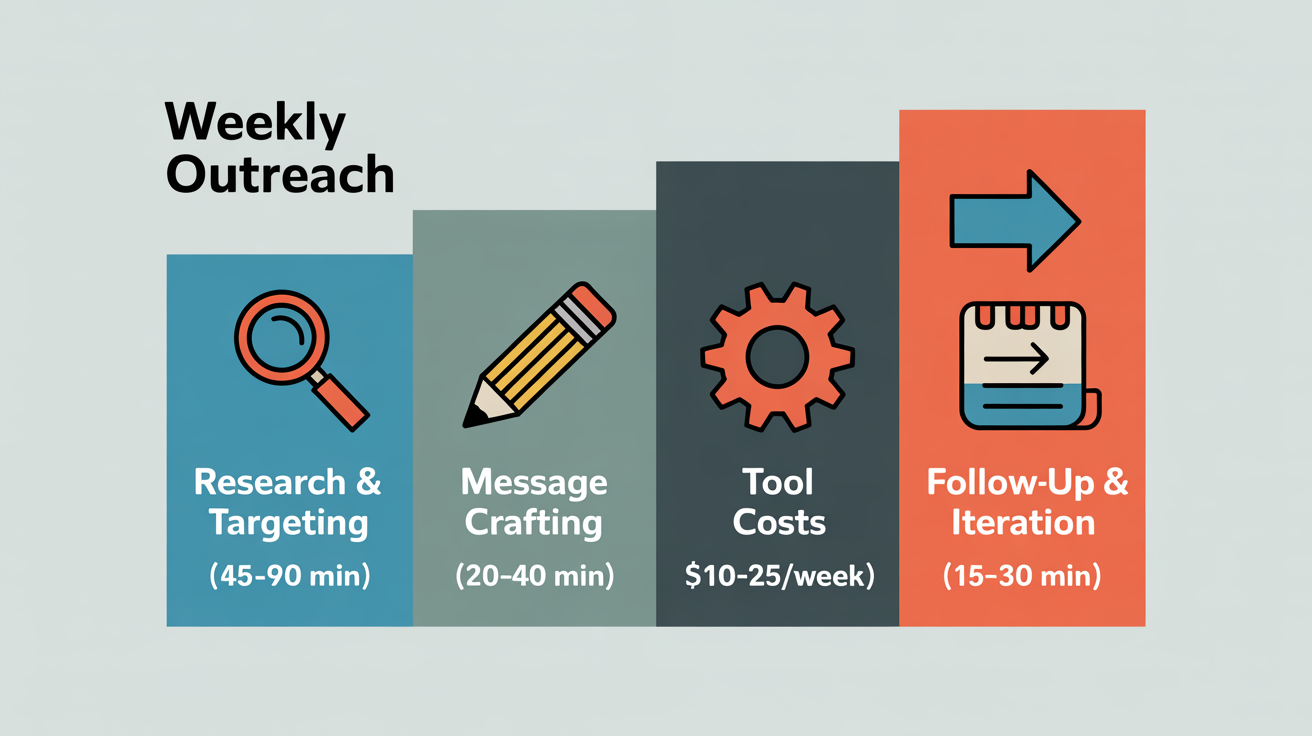
Breaking Down Your Outreach Costs: Research, Writing, Tools, and Follow-Up
Research and targeting eat the biggest chunk of outreach budget. Expect 60–80% of your weekly effort to land here, not in sending or tools. Shortcuts here drain results and spike per-lead costs fast.
| Category | Time/Week | Direct Cost | What Drives Cost Up | Leanest Option |
|---|---|---|---|---|
| Research & Targeting | 45–90 min | $30–$60 (time value) | Manual digging, bad lists, no signal filtering | Pre-qualified lists, proven triggers |
| Message Crafting | 20–40 min | $10–$25 (time value) | Writing every message from scratch | Tested templates, micro-personalization |
| Tool Stack | - | $10–$25/week | Multiple platforms, pricey licenses | One inbox, Apollo free/low-tier, GMass |
| Follow-up & Iteration | 15–30 min | $5–$15 (time value) | No automation, manual tracking | Sequencer, simple CRM, auto-reminders |
Research & Targeting
This is where campaigns live or die. Budget 45–90 minutes each week - $30–$60 in time if your hourly rate is $40. Start building lists from scratch, dig for every contact, or skip pre-qualification, and your costs balloon. LinkedIn Sales Navigator or Apollo's free tier can cut research time up to 50%, but only if you work from a tight targeting framework. The fastest operators run micro-segmented lists and repeatable research. For specifics, see how we research and prioritize companies for signal-driven targeting.
Message Crafting
Writing relevant outreach hits the second cost bucket - 20–40 minutes a week, or $10–$25 in time value. The slowest path? Rewriting from scratch for every contact. Top performers use short, tested templates, then personalize with context from research. Batch-test CTAs and intros, refine based on real replies. If you need structure, start with our framework for writing short, confident messages.
Tool Stack
Actual tool spend sits around $10–$25 per week for solo or small-team setups. Apollo gives you 100 credits per month free, paid plans start at $59/mo per user. GMass runs $25–$55/mo, Instantly at $30/mo base. Need image or video personalization? Lemlist starts at $59/mo per user. Go enterprise - Outreach.io or Salesloft - and you’ll pay $100–$150/mo per seat. More inboxes, bulk sending, or advanced analytics? Price jumps fast. Start lean. For tool breakdowns, see the complete playbook for proactive outreach.
- Apollo: Free (100 credits monthly), $59+/mo paid
- GMass: $25–$55/mo per sender
- Instantly: $30/mo base, scales for volume
- Lemlist: $59–$99/mo per user (for video/image)
Every extra inbox, contact, or feature adds cost. Strip your stack to the essentials. Redundant tools kill ROI.
Follow-Up & Iteration
Follow-ups and tweaks take 15–30 minutes weekly - $5–$15 in time value. Automate reminders and reply tracking with sequencers to save hours. Most real replies (8–12% rate) come from thoughtful follow-ups, not the first email. Manual tracking drags down efficiency. For advanced follow-up tactics, see designing follow-up sequences that reclaim lost opportunities and how we coach replies into interviews.
Iterate based on open rates, positive replies, and meetings - not gut feel. Track the right metrics: key metrics every job outreach campaign should track. For benchmarks, compare our outreach performance data.
The Real Sweet Spot: Tight, Signal-Driven Outreach
Generic blasts and mass resumes waste both time and budget. The cost-efficient model: short lists, personalized copy, automated follow-up. That’s where ROI jumps. That’s how top operators pull ahead. For full workflow details, see how to scale personalized outreach without losing the human touch.
The Hidden Costs of Outreach: Opportunity, Burnout, and Research Waste
Opportunity cost drains ROI for solo job seekers. Every extra hour spent “personalizing” low-potential contacts costs at least $50 in missed interview chances elsewhere. Most never see this hidden tax - mass outreach rarely delivers a payoff.
Opportunity Cost: Time Spent on the Wrong Leads
Only 15% of generic outreach gets a positive response, according to HubSpot data. The other 85%? Wasted research, writing, and follow-up. Five hours a week spent on poorly targeted lists bleeds out $250 in lost value - every single week. The root cause: chasing volume, not fit. Shrink your list, tighten your ICP, and zero in on roles with real upside. For specifics on measuring what actually works, check our outreach performance data and analysis.
Burnout: The Mental Crash of Repetitive Personalization
Burnout kills consistency. By week three, over 70% of solo job searchers drop the habit after slogging through endless personalization. Each intro gets duller, response rates dip. Burn 3 extra hours a week from fatigue or low motivation and you’re tossing another $60–$90 of time. What triggers it? Manual research, no templates, no batching. The fix: proven frameworks and automation. Our short, confident messaging system keeps energy high and results steady.
Research Waste: Chasing Bad Data and Dead Signals
Dirty data and unverified emails double your outreach cost. Missed signals. Bounced messages. Chasing people who’ve moved on. The biggest leaks:
- Email verification tools that don’t deliver: $20–$40/month in undelivered messages
- Unvetted lists: $10–$50/week sunk into dead-end research
- Manual tracking errors (duplicates, missed follow-ups): 1–2 hours/week lost ($20–$50 value)
High-signal outreach starts with clean data. Use platforms with built-in email verification, LinkedIn filtering, and campaign tracking to cut these losses. For a full workflow, see the complete playbook for proactive outreach.
Process Creep: Tool Overlap and Feature Bloat
Stack creep hits when you pile on tools solving the same problem. Most pay for 2–3 overlapping subscriptions - $40–$100/month down the drain. Common triggers: buying the “next best” app without auditing your stack, or splitting features across too many platforms. Review your workflow in how to scale personalized outreach without losing the human touch and cut out the excess.
How to Cut Weekly Outreach Costs Without Sacrificing Results
Cutting outreach costs starts with precision targeting. One message grounded in real signals beats a dozen generic blasts. Intercom’s Q2 2023 LinkedIn campaign proved it: response rates jumped from 12% to 28% when outreach matched recent funding or hiring triggers. Sharper targeting doesn’t just save money - it gets more interviews with less work.
- Prioritize High-Intent Triggers: Build lists using live signals - funding, hiring, exec changes. Ignore random prospecting. You’ll cut wasted research by 30–40% weekly, saving $40–$60 for every 10 prospects.
- Batch Research and Message Templates: Cap research at 15 minutes per prospect. Use the 100-word intro system to personalize fast. Most cut 2–3 hours of work per week - worth $40–$80 - by skipping the blank-page grind.
- Automate Multi-Step Sequences: Tools like One Cold Email or Instantly handle staged follow-ups tied to opens or clicks. Automation recovers up to 20% of leads that would vanish and cuts manual follow-up time by half - $30–$50 in weekly savings.
- Use Only Verified Data Sources: Bounced emails and dead leads waste time. Stick with verified platforms. Expect to save $20–$40 each week by skipping “ghost” outreach.
- Repurpose Winning Copy and Follow-Up Logic: Save proven messages as templates. Build snippets for common triggers - funding, launches, hiring. Reusing sharp copy buys back 1–1.5 hours weekly, or $20–$35.
- Automate CRM Logging and Scheduling: Connect your outreach tool to your CRM. Batch review replies, schedule follow-ups, skip manual data entry. That’s another $10–$20 saved every week.
You can only cut so far - quality still wins. Fewer, targeted messages drive better results than mass-blasting. But skimping on research or skipping follow-ups tanks your ROI. Cheap lists and one-size-fits-all copy drag down response rates. The right move: double down on high-signal outreach, automate grunt work, and save the manual effort for real opportunities. For details on which outreach metrics actually move the needle, or see the step-by-step proactive outreach workflow.
Weekly Outreach Cost: Your Real-World Baseline and the Top Way to Save
Plan for 1.5 to 3 hours weekly and a $45 to $150 value for focused outreach. That's your baseline - time plus essential tools. No guesswork, just what works for job seekers who want results, not just inbox noise.
Want to cut costs and get better outcomes? Shrink your research pool to only the highest-signal leads. Automate anything repetitive. Skip mass-blasting. Double down on relevance and follow-up. You'll see sharper response rates and save hours. For tactical steps, review how to prioritize companies and designing follow-up sequences that recover missed opportunities.
Stick to this budget and workflow. Track what actually gets responses. For metrics and benchmarks, see how we measure outreach performance and the full proactive outreach workflow.
Build an Unfair Advantage Proactively and Update Your Job Search Strategy to Today's Job Market.
$197
Learn MoreFrequently Asked Questions
Is it better to send more emails or spend more time on each one?
Prioritize quality: personalized, targeted emails with a short follow-up sequence convert far better than high‑volume generic blasts. Practically, target ideal customer profiles, send roughly 30 cold emails/day per mailbox (with ~20 warm‑up emails during initial warming), and use 2–4 follow‑ups (two is often the sweet spot) to maximize replies without harming deliverability. Use templates plus light personalization, warm your sending domain, respect provider limits (e.g., Google Workspace ≈2,000/day ceiling), and disengage unresponsive prospects to preserve reputation.
Are there any free tools that help lower the cost of job search outreach?
Yes - free tools like LinkedIn Basic, Gmail + Google Sheets, Hunter.io (free tier: ~25 searches/month), and free apps like Trello, Notion or Canva can substantially lower outreach costs. Use LinkedIn for targeted connections, Hunter to find/verify emails, a free mail‑merge add‑on to send personalized batches from Gmail, and Trello/Notion or Sheets to track follow‑ups instead of paying for premium outreach platforms.
How should I split the recommended 1.5–3 hours across research, list‑building, message writing, and follow‑ups each week?
For 1.5 hours/week: ~36 min research (40%), ~23 min list‑building (25%), ~23 min message writing (25%), ~8 min follow‑ups (10%). For 3 hours/week: ~85 min research (45%), ~45 min list‑building (25%), ~35 min message writing (20%), ~15 min follow‑ups (10%). Do more research/targeting (revisit Phase 1/2) if you see weak signals or low response rates; stop generic “spray-and-pray” messages and avoid weekend follow‑ups (use weekday spacing of 2–5 days and 4–9 touches per campaign). If you’re already doing the daily/weekly cadence (2–3 outreach/day, Tue/Thu deep research, Wed applications, Fri metrics) you’re likely on track; if response or interview metrics lag your timeline, reallocate 30–45 extra minutes/week to research and targeting.
Which specific outreach tasks are worth automating (and which should remain manual) to save time without hurting response rates?
Automate routine, scalable work: sequence logic and send timing (send emails on Tuesday or Thursday - Tuesday edges out Thursday for replies), automated follow-ups, delivery/validation (bounced emails, inactive contacts, role-change and generic‑inbox suppression), contact enrichment, dialer sequencing, lead scoring, multi‑channel scheduling, and one‑variable A/B testing of subject/sender/time. Keep manual: high‑quality research and contextual personalization (the individualized opening and CTA), reply handling and qualification calls/meetings, nuanced escalation decisions, and final quality reviews to catch merge‑tag mistakes or irrelevant templates. Always A/B test one variable at a time, track reply/positive‑reply rates (not just opens), and use automation to surface signals while preserving human judgment for context and high‑value interactions.
If I only have 30 minutes per week, what high‑impact outreach routine should I follow to maximize replies?
Weekly 30‑minute routine: 10 minutes prospecting/micro‑segment ~10 ideal contacts, 10 minutes writing/sending 4–6 ultra‑short (<80 words) personalized outreach emails with one simple CTA (e.g., “20 minutes this week?”), 10 minutes scheduling/sending the next follow‑up to non‑responders and triaging quick replies. Use a 3‑follow‑up sequence spaced ≈4 days apart (final “breakup” included), make each follow‑up unique and add value or social proof, and avoid weekends/Mondays. Automate templates and follow‑ups, target a 5–10% reply rate as baseline (top performers hit 15–20% with micro‑segmentation), and iterate weekly based on reply metrics.
What weekly KPIs should I track (responses, meetings booked, replies per hour, etc.) to tell if my outreach is efficient?
Track weekly: outbound touches (emails/calls), raw replies and reply rate (% = replies ÷ touches), positive-reply → meetings booked, meeting show rate (meetings held ÷ meetings booked), reply-per-hour (rep productivity), reply-to-meeting and meeting-to-opportunity conversion rates, pipeline value (SQLs sourced), and unsubscribe/spam rates. Benchmark against industry norms: SaaS/Tech 8–12% replies, Professional Services 10–15%, Manufacturing 5–8%, Healthcare 6–10%, Finance 7–11%; enterprise targets ~4–6% and SMBs ~10–15% - note follow-ups drive ~55% of replies and a 5–10% follow-up reply rate is solid. If show rate is under ~60–70% or conversions are weak, optimize messaging/timing (early morning sends and Tue/Thu), keep emails <100 words, and use a 1–3 step follow-up sequence while A/B testing subject lines and CTAs.
What is an effective follow‑up cadence and how many follow‑ups per contact are reasonable before stopping to avoid spamming?
Use 3–5 email touches per contact with escalating intervals - e.g., initial message, follow‑ups at 2–3 days, 7 days, 14 days and a final check around 30 days - then stop if there’s no open or reply. Only email opted‑in recipients (unsolicited mail drives spam complaints and ruins sender/domain reputation; even a 0.3–0.5% complaint rate is catastrophic), and suppress or remove addresses after 3–5 unsuccessful attempts and any hard bounces. Add 1–2 cross‑channel touches (LinkedIn/phone) and continuously monitor opens, replies, unsubscribes and complaint rates to cut the cadence sooner if engagement is low.

Luis Gamardo built a modern job search framework for a broken recruiting system. His approach teaches how to send cold emails at every stage of the hiring process, so qualified candidates can get noticed by the right people at the right time - including before jobs are even posted.
Sources
- salescaptain.io
- salesmotion.io
- medium.com
- freelancecake.com
- skrapp.io
- infraforge.ai
- herohunt.ai
- prospeo.io
- zanatemarketing.com
- aisdr.com
- saleshive.com
- sendr.ai
- trykondo.com
- close.com
- ghosh.com
- hunter.io
- hunter.io
- siegemedia.com
- linkedsavvy.com
- expandi.io
- anyleads.com
- amplemarket.com
- herohunt.ai
- getboomerang.ai
- primeforge.ai
- mailtrap.io
- coldemailgenerators.com
- leadcrm.io
- hubsell.com
- artemisleads.com
- dealcode.ai
- monday.com
- mailforge.ai
- qubit.capital
- blog.hubspot.com
- listkit.io
- hunter.io
- isazeni.com
- trykondo.com
- emailtooltester.com
- qubit.capital
- ringover.com
- copilotai.com
- qxglobalgroup.com
- leadsatscale.com
- lobehub.com
- generect.com
- outreach.io
- sendr.ai
- instantly.ai
- salesroads.com
- instantly.ai
- belkins.io
- superhumanprospecting.com
- oppora.ai
- b2brocket.ai
- support.outreach.io
- true6alliance.com
- outreach.io
- support.outreach.io
- botdog.co
- commonroom.io
- toptechnewsletter.com
- everyhome.org
- sashandcompany.com
- visitorreach.com


